
|
Surveys and data Instruments
Support to other department sections Support Dr. Scient. thesis Contribution to "Scientific infrastructure"
Obsolete, kept for reference
Last update: April 30, 2025, at 08:49 AM |
USING SeismicUnixConversion of SEG-B, SEG-C to Seismic Unix formatSEG-Y data format and how it differs from the Seismic Unix formatIn order to process data with Seismic Unix you need to be familiar with the layout of SEG-Y files and how it differs from the Seismic Unix (SU) data format. First, get the SEG-Y standard from The Society of Exploration Geophysicists (SEG): The SEG-Y format specification from SEG:
This is how a SEG-Y file looks like: 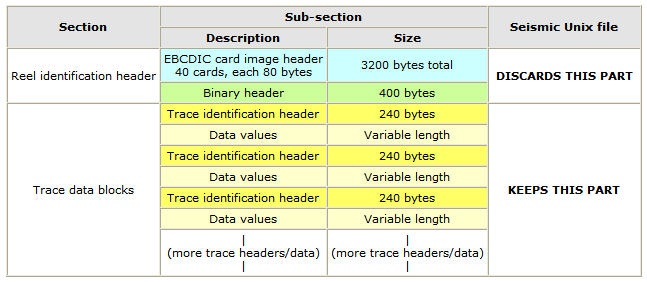 SEG-Y format structure. The SU data format consists of the trace data blocks ONLY. The reel identification header can later be inserted when data is exported in the SEG-Y format. SU files stores floating point values in "the native binary format of the machine you are running the programs on" - quote from section 3.1.1 (p.21) of the SeismicUnix manual. It's difficult to spot a mix-up of IBM floating point format (as used in SEG-Y files) and IEEE 754 floating point format (the floating point format used by e.g. PCs). Here's some background information. SEG-Y Reel Identification HeaderSee this document (local copy). The 3200 byte SEG-Y EBCDIC Reel Header12345678901234567890123456789012345678901234567890123456789012345678901234567890 C 1 CLIENT COMPANY CREW NO C 2 LINE AREA MAP IS C 3 REEL NO DAY-START OF REEL YEAR OBSERVER C 4 INSTRUMENT: MFG MODEL SERIAL NO C 5 DATA TRACES/RECORD AUXILIARY TRACES/RECORD CDP FOLD C 6 SAMPLE INTERVAL SAMPLES/TRACE BITS/IN BYTES/SAMPLE C 7 RECORDING FORMAT FORMAT THIS REEL MEASUREMENT SYSTEM C 8 SAMPLE CODE: FLOATING PT FIXED PT FIXED PT-GAIN CORRELATED C 9 GAIN TYPE: FIXED BINARY FLOATING POINT OTHER C10 FILTERS: ALIAS HZ NOTCH HZ BAND - HZ SLOPE - DB/OCT C11 SOURCE: TYPE NUMBER/POINT POINT INTERVAL C12 PATTERN: LENGTH WIDTH C13 SWEEP: START HZ END HZ LENGTH MS CHANNEL NO TYPE C14 TAPER: START LENGTH MS END LENGTH MS TYPE C15 SPREAD: OFFSET MAX DISTANCE GROUP INTERVAL C16 GEOPHONES: PER GROUP SPACING FREQUENCY MFG MODEL C17 PATTERN: LENGTH WIDTH C18 TRACES SORTED BY: RECORD CDP OTHER C19 AMPLITUDE RECOVERY: NONE SPHERICAL DIV AGC OTHER C20 MAP PROJECTION ZONE ID COORDINATE UNITS C21 PROCESSING: C22 PROCESSING: C23 C24 C25 C26 C27 C28 C29 C30 C31 C32 C33 C34 C35 C36 C37 C38 C39 C40 END EBCDIC The 400 byte SEG-Y Binary Reel Header
--------------------------------------------------------------------------------
Bytes         Description
--------------------------------------------------------------------------------
001 - 004     Job identification number.
005 - 008  *  Line number.
009 - 012  *  Reel number.
013 - 014  *  Number of data traces per record.
015 - 016  *  Number of auxiliary traces per record.
017 - 018  *  Sample interval of this reel's data in microseconds
019 - 020     Sample interval of original field recording in microseconds.
021 - 022  *  Number of samples per trace for this reel's data.
023 - 024     Number of samples per trace in original field recording.
025 - 026  *  Data sample format code:
                  1 = 32-bit IBM floating point
                  2 = 32-bit fixed-point (integer)
                  3 = 16-bit fixed-point (integer)
                  4 = 32-bit fixed-point with gain code (integer)
           $      5 = 32-bit IEEE floating point
           $      6,7 = Not currently used
           $      8 = 8-bit, two's complement integer)
027 - 028  *  CDP fold (expected number of data traces per ensemble).
029 - 030     Trace sorting code:
                  1 = as recorded
                  2 = CDP ensemble
                  3 = single fold continuous profile
                  4 = horizontally stacked
031 - 032     Vertical sum code (1 = no sum, 2 = two sum, ...)
033 - 034     Sweep frequency at start in Hertz.
035 - 036     Sweep frequency at end in Hertz.
037 - 038     Sweep length in milliseconds.
039 - 040     Sweep type code:
                  1 = linear
                  2 = parabolic
                  3 = exponential
                  4 = other
041 - 042     Trace number of sweep channel.
043 - 044     Sweep trace taper length at start in milliseconds.
045 - 046     Sweep trace taper length at end in milliseconds.
047 - 048     Taper type code:
                  1 = linear
                  2 = cosine squared
                  3 = other
049 - 050     Correlated data traces (1 = no, 2 = yes).
051 - 052     Binary gain recovered (1 = yes, 2 = no).
053 - 054     Amplitude recovery method code:
                  1 = one
                  2 = spherical divergence
                  3 = AGC
                  4 = other
055 - 056  *  Measurement system (1 = meters, 2 = feet).
057 - 058     Impulse signal polarity (increase in pressure or upward
              geophone case movement gives 1=negative or 2=positive number).
059 - 060     Vibratory polarity code (seismic lags pilot signal by):
                  1 = 337.5 to 22.5 degrees
                  2 = 22.5 to 67.5 degrees
                  3 = 67.5 to 112.5 degrees
                  4 = 112.5 to 157.5 degrees
                  5 = 157.5 to 202.5 degrees
                  6 = 202.5 to 247.5 degrees
                  7 = 247.5 to 292.5 degrees
                  8 = 292.5 to 337.5 degrees
061 - 400     Unassigned (for optional information)s

* strongly recommended
$ Defined in rev 1 of the SEGY standard
SEG-Y Trace Identification HeaderThe 240-byte binary trace header consists of 2-byte and 4-byte integers:
--------------------------------------------------------------------------------------------------------
Byte #    2/4-byte   SU Keyword    Description
--------------------------------------------------------------------------------------------------------
001 - 004    4     *  tracl        Trace sequence number within line.
005 - 008    4        tracr        Trace sequence number within reel.
009 - 012    4     *  fldr         Original field record number.
013 - 016    4     *  tracf        Trace sequence number within original field record.
017 - 020    4        ep           Energy source point number.
021 - 024    4        cdp          CDP ensemble number.
025 - 028    4        cdpt         Trace sequence number within CDP ensemble.
029 - 030    2     *  trid         Trace identification code:
                                       1 = seismic data
                                       2 = dead
                                       3 = dummy
                                       4 = time break
                                       5 = uphole
                                       6 = sweep
                                       7 = timing
                                       8 = water break
                                       9+ = optional use
                                       SU specific id codes, look here
031 - 032    2       nvs           Number of vertically summed traces yielding this trace.
033 - 034    2       nhs           Number of horizontally stacked traced yielding this trace.
035 - 036    2       duse          Data use (1 = production, 2 = test).
037 - 040    4       offset        Distance from source point to receiver group.
041 - 044    4       gelev         Receiver group elevation.
045 - 048    4       selev         Surface elevation at source.
049 - 052    4       sdepth        Source depth below surface.
053 - 056    4       gdel          Datum elevation at receiver group.
057 - 060    4       sdel          Datum elevation at source.
061 - 064    4       swdep         Water depth at source.
065 - 068    4       gwdep         Water depth at receiver group.
069 - 070    2       scalel        Scalar for elevations and depths (+ = multiplier, - = divisor).
071 - 072    2       scalco        Scalar for coordinates (+ = multiplier, - = divisor).
073 - 076    4       sx            X source coordinate.
077 - 080    4       sy            Y source coordinate.
081 - 084    4       gx            X receiver group coordinate.
085 - 088    4       gy            Y receiver group coordinate.
089 - 090    2       counit        Coordinate units (1 = length in meters or feet, 2 = arc seconds).
091 - 092    2       wevel         Weathering velocity.
093 - 094    2       swevel        Subweathering velocity.
095 - 096    2       sut           Uphole time at source.
097 - 098    2       gut           Uphole time at receiver group.
099 - 100    2       sstat         Source static correction.
101 - 102    2       gstat         Receiver group static correction.
103 - 104    2       tstat         Total static applied.
105 - 106    2       laga          Lag time between end of header and time break in milliseconds.
107 - 108    2       lagb          Lag time between time break and shot in milliseconds.
109 - 110    2       delrt         Lag time beteen shot and recording start in milliseconds.
111 - 112    2       muts          Start of mute time.
113 - 114    2       mute          End of mute time.
115 - 116    2    *  ns            Number of samples in this trace.
117 - 118    2    *  dt            Sample interval of this trace in microseconds.
119 - 120    2       gain          Field instrument gain type code:
                                       1 = fixed
                                       2 = binary
                                       3 = floating point
                                       4+ = optional use
121 - 122    2       igc           Instrument gain constant.
123 - 124    2       igi           Intrument early gain in decibels.
125 - 126    2       corr          Correlated (1 = no, 2 = yes).
127 - 128    2       sfs           Sweep frequency at start.
129 - 130    2       sfe           Sweep fequency at end.
131 - 132    2       slen          Sweep length in milliseconds.
133 - 134    2       styp          Sweep type code:
                                       1 = linear
                                       2 = parabolic
                                       3 = exponential
                                       4 = other
135 - 136    2       stas          Sweep taper trace length at start in milliseconds.
137 - 138    2       stae          Sweep taper trace length at end in milliseconds.
139 - 140    2       tatyp         Taper type code:
                                       1 = linear
                                       2 = cosine squared
                                       3 = other
141 - 142    2       afilf         Alias filter frequency.
143 - 144    2       afils         Alias filter slope.
145 - 146    2       nofilf        Notch filter frequency.
147 - 148    2       nofils        Notch filter slope.
149 - 150    2       lcf           Low cut frequency.
151 - 152    2       hcf           High cut frequency.
153 - 154    2       lcs           Low cut slope.
155 - 156    2       hcs           High cut slope.
157 - 158    2       year          Year data recorded.
159 - 160    2       day           Day of year.
161 - 162    2       hour          Hour of day (24-hour clock).
163 - 164    2       minute        Minute of hour.
165 - 166    2       sec           Second of minute.
167 - 168    2       timbas        Time basis (1 = local, 2 = GMT, 3 = other).
169 - 170    2       trwf          Trace weighting factor for fixed-point format data.
171 - 172    2       grnors        Geophone group number of roll switch position one.
173 - 174    2       grnofr        Geophone group number of first trace of original field record.
175 - 176    2       grnlof        Geophone group number of last trace of original field record.
177 - 178    2       gaps          Gap size (total number of groups dropped).
179 - 180    2       otrav         Overtravel associated with taper (1 = down/behind, 2 = up/ahead).
181 - 240                          Unassigned (for optional information).
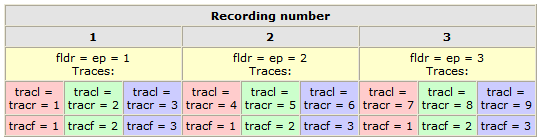
* strongly recommended For SU assignments of positions 181 - 240, look here. Relationship between fldr, ep, tracl, tracr, tracfLet's reiterate:
Assumptions:
 Seismic Unix (SU) links
 SU Quick Install, version 40Assuming CWPHOME=/usr/local/SU and that you're on a Linux Intel box (we're using Fedora 7).
1. In /etc/profile (or profile.local):
      CWPROOT="/usr/local/SU"
      PATH="$PATH:/usr/local/SU/bin"
      export PATH CWPROOT
   Log out, then in again.

2. Do NOT install as root.
   Get ftp://ftp.cwp.mines.edu/pub/cwpcodes/cwp_su_all_40.tgz
   Save in /usr/local/SU
   First make this directory (as root), then change ownership:
       mkdir /usr/local/SU
       chown xxx /usr/local/SU
   (assuming you are user xxx)
   Uncompress:
       cd /usr/local/SU/
       tar -xzvf cwp*

3. First install these packages on your linux box : compat-gcc-34 (else suxgraph will not work properly), all lesstif packages.

4. Rename /usr/local/SU/Makefile.config:
        mv Makefile.config Makefile.config.original
   Download this Makefile.config file and put it in /usr/local/SU/src.
   Note: From release 39 (this configuration will provide support for large files > 2GB.)

5. You're not root, are you? If not:
      cd /usr/local/SU/src
      make install
      make xtinstall
   If you want to compile additional code, check README_TO_INSTALL

6. Test the installation:
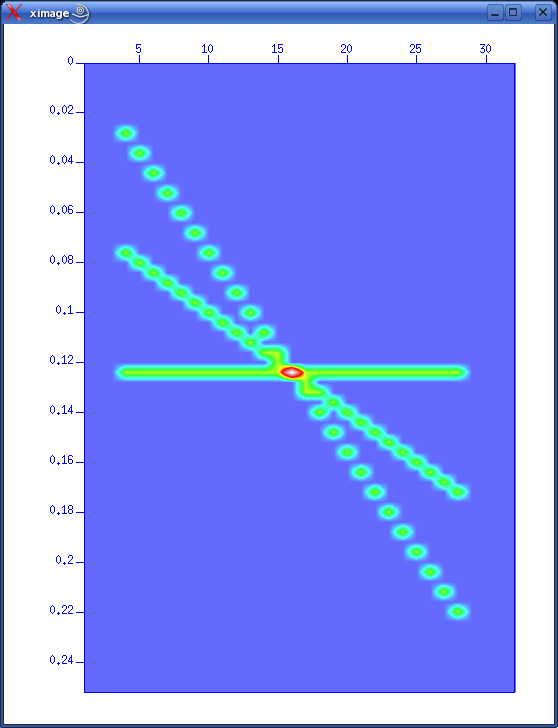
      suplane | suxgraph &
      suplane | suximage &
   Use <CTRL>+h to change colour palette, to get this (click to enlarge):
 segdread: Important note on gcc version 3.2.2 (RedHat 9.0), gcc version 3.3.4 (SUSE 9.2)There are problems with gcc version 3.2.2 (RedHat 9.0), and version 3.3.4 (SUSE 9.2) - the segdread will be broken. To recompile segdread first get the compat-gcc RPM's (or you can download a binary segdread compiled on FC1 Linux with compat-gcc from here; place it in the $CWPROOT/bin directory, overwriting the old version): compat-gcc-7.3-2.96.118.i386.rpm compat-gcc-c++-7.3-2.96.118.i386.rpm compat-libstdc++-7.3-2.96.118.i386.rpm compat-gcc-g77-7.3-2.96.118.i386.rpm Then rpm -Uvh compat* You must first remove or rename the original version of $CWPROOT/bin/segdread before proceeding, Then edit Makefile.config by setting CC = gcc296 Recompile segdread by make sfremake You can also compile SU from scratch with gcc version 2.9.6. |